CI triggers
To run a security scan automatically whenever you push code or open a pull/merge request (PR/MR), add a scan trigger step to your CI pipeline. Source code and container images integrate the same way. Time-based scheduled runs are covered in Scan schedules.
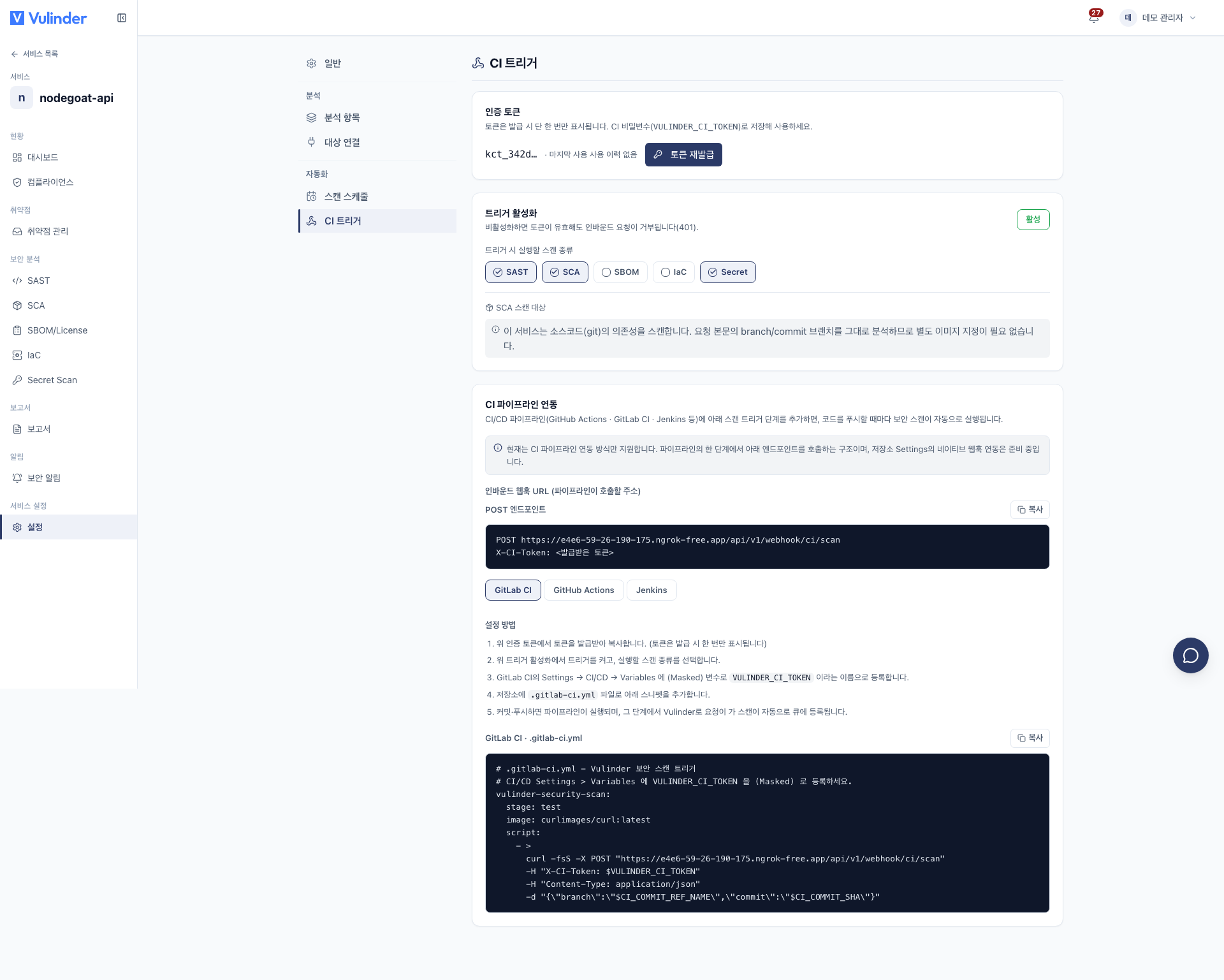
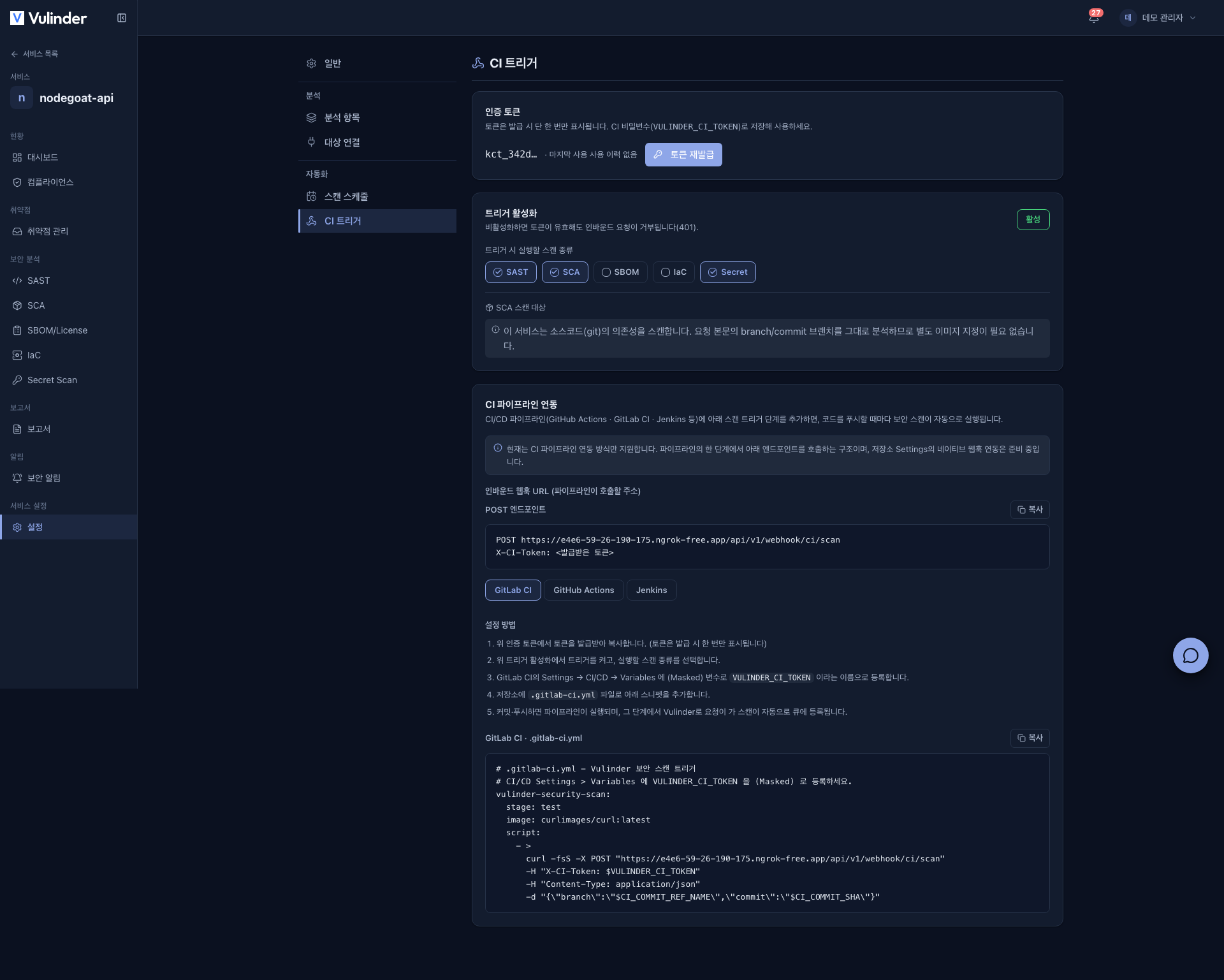
- Where to set up : The service sidebar [Settings] > Automation > CI triggers tab
- How it works : The pipeline calls an inbound webhook (token auth)
- Supported types : Source code (Git), container images
- Supported tools : GitLab CI, GitHub Actions, Jenkins, and more
Which types are supported
CI triggers are configured per service. The scans you can run and what they scan depend on the service type.
| Service type | Scans you can run | Scan target |
|---|---|---|
| Source code (Git) | SAST, SCA, SBOM, IaC, Secret | The Git source of the branch set at registration (latest commit) |
| Container images | Image SCA, SBOM, image hardening | A registry image (a specific image, or the latest image automatically) |
The scan types actually shown are limited to the analyses enabled on that service.
Web service, Server / host, SBOM upload and Binary file do not support CI triggers. Run these manually from each analysis tab, or periodically with the service's scan schedule.
Setup steps
Do this in the service's [Settings] > Automation > CI triggers tab.
- Issue a token : Generate an authentication token.
- The token is shown only once when issued, so copy it immediately.
- Regenerating a token invalidates the old one instantly.
- Enable the trigger and pick scan types : Turn the trigger on and choose which scans run on push. For container image services, choose the target image in one of these ways.
- Specify an image to scan it.
- Latest image (auto) : CI scans whatever image it just built/pushed each time.
- Store it as a CI secret : Register the issued token as the secret variable VULINDER_CI_TOKEN in your CI tool. Never put the token in code in plaintext.
- Add the snippet to your pipeline : Add the tool-specific snippet below to your repository. The CI triggers tab shows the exact inbound webhook URL and snippet for your service.
- Commit/push : The pipeline runs, and at that step the scan is automatically queued.
Request contract
The pipeline step calls an inbound webhook. The request does not carry a service ID. The token identifies the service.
- Method/address :
POST <inbound webhook URL>(format:.../api/v1/webhook/ci/scan). The exact address is shown on the CI triggers tab. - Header :
X-CI-Token: <your token> - Body (JSON, optional) :
{ "branch": "...", "commit": "..." }. You can send both values, but they do not change what is scanned: the latest state of the branch set at registration is always scanned. - Response (200) :
{ "queued": [...], "failed": [...] }, returning the scans that were queued along with any that failed.
Snippets by tool
Reference the token via each tool's secret variable (VULINDER_CI_TOKEN), and replace <inbound webhook URL> below with the address shown on the CI triggers tab.
GitLab CI
Register VULINDER_CI_TOKEN as a (Masked) variable under CI/CD > Variables, then add this to .gitlab-ci.yml.
vulinder-security-scan:
  stage: test
  image: curlimages/curl:latest
  script:
    - >
      curl -fsS -X POST "<inbound webhook URL>"
      -H "X-CI-Token: $VULINDER_CI_TOKEN"
      -H "Content-Type: application/json"
      -d "{\"branch\":\"$CI_COMMIT_REF_NAME\",\"commit\":\"$CI_COMMIT_SHA\"}"
GitHub Actions
Register VULINDER_CI_TOKEN under Settings > Secrets and variables > Actions, then add .github/workflows/vulinder-security.yml.
name: Vulinder Security Scan
on: [push, pull_request]
jobs:
  trigger-scan:
    runs-on: ubuntu-latest
    steps:
      - name: Trigger Vulinder scan
        run: |
          curl -fsS -X POST "<inbound webhook URL>" \
            -H "X-CI-Token: ${{ secrets.VULINDER_CI_TOKEN }}" \
            -H "Content-Type: application/json" \
            -d "{\"branch\":\"${{ github.ref_name }}\",\"commit\":\"${{ github.sha }}\"}"
Jenkins
Register VULINDER_CI_TOKEN as a Secret text credential under Manage Jenkins > Credentials, then add it to your Jenkinsfile.
pipeline {
  agent any
  stages {
    stage('Vulinder Security Scan') {
      steps {
        withCredentials([string(credentialsId: 'VULINDER_CI_TOKEN', variable: 'VULINDER_CI_TOKEN')]) {
          sh '''
            curl -fsS -X POST "<inbound webhook URL>" \
              -H "X-CI-Token: $VULINDER_CI_TOKEN" \
              -H "Content-Type: application/json" \
              -d "{\"branch\":\"${GIT_BRANCH}\",\"commit\":\"${GIT_COMMIT}\"}"
          '''
        }
      }
    }
  }
}
Behavior and limits
- Authentication failure (401) : The request is rejected in these cases.
- The token is missing or wrong
- The trigger is disabled. Inbound requests are blocked even with a valid token.
- Rate limit : To stop invalid-token spam, requests are limited to 30 per minute per IP.
- In-progress scan cap : If a service already has too many scans in progress, requests are briefly rejected (429). CI can simply retry after a short wait.
- Duplicate request merging : Repeated identical scan requests to the same service in quick succession are automatically merged into one.
- Native repository webhooks : Only the CI pipeline integration is supported today. Native repository Settings webhooks are in preparation.
Related documents
- Scan schedules : Scheduled periodic automatic scans
- Source code (Git) : Enable SAST, SCA, Secret, IaC, SBOM
- Container images : Registry image SCA and hardening
- Vulnerability management : Review and handle automated scan results
- Notification settings : Get scan completion alerts